


















Last Updated: 2026-09-04
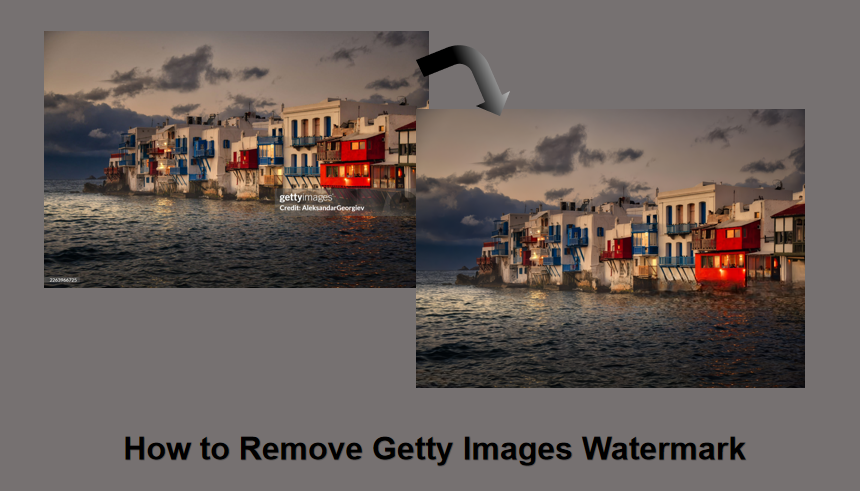
Finding the perfect stock photo on Getty Images is thrilling—until a giant, repeating watermark ruins your draft layout. Whether you're building a client pitch deck, testing a website mockup, or framing a mood board, prominent watermarks can make even the most creative projects look amateur.
In this guide, you’ll discover how to remove Getty Images watermarks in seconds using cutting-edge AI tools like HitPaw, alongside full step-by-step tutorials for traditional software like Photoshop and GIMP. We'll also cover how to erase logos while keeping your original image crisp, HD, and distortion-free.
Disclaimer: Removing watermarks from images without permission may be illegal. This guide is for learning only. You should buy a license if you want to use the image for work. This supports the creators and keeps you safe.
Method Overview: Free Online AI Watermark Remover vs. Traditional Image Editors
Restoring an image without unwanted marks can be done in various ways, depending on your editing experience and the tools you have available. Generally, users can choose between manual editing methods and AI powered automatic removal.
| Feature | HitPaw Online AI | Adobe Photoshop | GIMP | Photopea |
|---|---|---|---|---|
| Best For | Absolute Beginners & Fast Edits | High‑End Professional Editing | Open‑Source Desktop Users | Quick In‑Browser Edits |
| Skill Required | None (1‑Click Selection) | Intermediate to Advanced | Intermediate | Intermediate |
| Speed | 5–10 Seconds | 3–10 Minutes | 5–15 Minutes | 1–3 Minutes |
| Processing Type | Cloud‑Based AI Inpainting | Local Pixel Reconstruction | Manual Cloning & Healing | In‑Browser Content Fill |
| Cost | Free Trial / Web App | Paid Subscription | 100% Free | Free (Ad‑Supported) |
Which Getty Images Watermark Remover Should You Choose?
- Choose HitPaw Online Watermark Remover if you prefer an AI-assisted workflow that requires less manual retouching.
- Choose Photoshop if you need detailed control and already have experience with professional image editing.
- Choose GIMP if you want a free and open-source alternative with extensive manual editing tools.
- Choose Photopea if you want to edit images directly from a browser without installing desktop software.
Method 1. Remove Getty Watermarks Online Free with AI (Best for Beginners)
If manual editing tools feel too complicated, an AI powered watermark remover can make the process faster and easier. HitPaw Online Image Watermark Remover simplifies watermark removal by automatically detecting unwanted marks and restoring the affected areas.
HitPaw uses AI image inpainting technology to analyze the watermark and surrounding background. It understands nearby textures, colors, and patterns, then fills the covered areas with natural looking details. This allows users to remove watermarks with just a few clicks without needing advanced editing skills. With its simple interface and automated workflow, HitPaw is a great choice for beginners, content creators, photographers, and anyone who wants quick image editing results.
Why choose HitPaw Online Image Water Remover:
- AI-Powered Precision: Automatically detects and erases watermarks without manual brushing.
- High-Quality Export: Maintains the original resolution and clarity of your Getty image.
- Rapid Processing: Delivers clean results in seconds using cloud-based computing.
- No Technical Skill Needed: Designed with an intuitive interface for total beginners.
- Privacy Guaranteed: Secure encryption ensures your images are deleted after processing.
- No Software Bloat: Works directly in your browser, with no downloads.
HitPaw provides a simple way to create clean images, whether you are a content creator, marketer, photographer, or casual user.
Steps To Remove Getty Images Watermark with HitPaw
Follow these three simple steps to clear your images:
Upload the Image: Visit the HitPaw Online website and click the large "Choose Image" button to upload your watermarked Getty image. You can also simply drag and drop the file directly into the designated area in your browser window.

Select the Watermark: Use the intuitive brush tool to highlight the area covered by the Getty Images logo. The AI is smart enough that you don't need to be perfectly precise. Just ensure the entire watermark is within the blue selection zone for the best results.
Remove and Download: Click the "Remove" button to watch the AI process the image in real time. Once the watermark disappears, preview the result to ensure satisfaction, then click "Download" to save your clean, high quality image to your local device.
Method 2: Remove Getty Images Watermark Using Traditional Tools
Traditional image editing tools rely on a manual approach that combines technical selection with advanced texture synthesis to patch over watermarked areas. Unlike automated AI, these programs give you granular, pixel level control. It allows you to sample specific parts of the background to ensure a seamless blend. By using tools, one can easily reconstruct the pixels hidden beneath the Getty logo. This process involves a deep understanding of light, shadow, and texture to ensure the final result looks natural.
1. Remove Getty Images Watermark with Adobe Photoshop
Adobe Photoshop is one of the most widely used professional image editing applications. It provides selection, masking, healing, cloning, and Content-Aware tools that can help users reconstruct simple areas of an image.
For authorized image editing, Photoshop is especially useful when the selected area contains relatively simple backgrounds, textures, or repetitive patterns.
How to Edit an Unwanted Mark in Photoshop
- Open the authorized image in Photoshop.
- Create a duplicate layer to preserve the original image.
- Select the unwanted area using an appropriate selection tool.
- Use Content‑Aware Fill, Healing, or Clone tools to reconstruct the selected area.
- Review the result and make additional adjustments if necessary.
- Export the edited image.
 Pros
Pros
- Offers industry leading content aware fill for seamless removal.
- A layer based editing system preserves all original image data.
- Advanced healing brushes provide pixel perfect texture matching.
- Provides a highly customizable workspace for professional efficiency.
 Cons
Cons
- A monthly subscription model can be quite expensive annually.
- Extremely steep learning curve for complete beginners.
- Requires high end computer hardware for smooth performance.
2. GIMP (GNU Image Manipulation Program)
GIMP, short for GNU Image Manipulation Program, is a free and open-source image editor. It is available for Windows, macOS, and Linux and provides many tools for manual image retouching.
GIMP includes Clone and Heal tools that can be used to reconstruct selected parts of an image. It is a useful option for users who want advanced editing capabilities without paying for a professional subscription.
How to Remove a Getty Images watermark in GIMP
- Create a duplicate of the original layer.
- Select the area that needs editing.
- Use the Clone or Heal tool to reconstruct the surrounding area.
- Adjust the brush size, opacity, and source area.
- Review the result and make additional corrections.
- Export the finished image.
GIMP provides extensive manual control, but users may need more time to achieve natural‑looking results when working with complicated backgrounds.
Pros
- Completely free and open source for all creative users.
- The powerful Resynthesizer plugin enables automated patch filling.
- Full cross platform compatibility for Windows, Mac, and Linux.
- Lightweight installation saves valuable disk space and memory.
Cons
- The free version displays distracting ads during the process.
- Performance depends heavily on your current internet connection.
- Lacks the deepest pro level filters for high end work.
3. Photopea
Photopea is a browser based powerhouse that expertly mirrors the Photoshop interface, making it an excellent "on-the-go" solution for watermark removal without installing heavy software. It supports native PSD files and offers a surprisingly capable Content Aware Fill tool right within your web browser.
Its unmatched accessibility. You simply upload your image to the web app and use the familiar toolbar to select and heal watermarked sections. It is perfect for quick edits on shared computers when you need professional grade results without installing local software.
Pros
- No installation is needed because it works directly in your web browser.
- Supports a massive variety of professional file formats.
- Interface design is very similar to Adobe Photoshop.
- The free version includes most essential professional editing tools.
Cons
- The free version displays distracting ads during the process.
- Performance depends heavily on your current internet connection.
- Lacks the deepest pro level filters for high end work.
FAQs on Removing Getty Images Watermark
The best way is to buy the image license. But for personal use, you can use tools like HitPaw. You can also use Photoshop to hide the mark. Just remember, you should not use these images for business without a license.
Using traditional "smudge" tools often results in blurriness. However, modern AI tools like HitPaw are designed to maintain the original pixel density and sharpness. It ensures that the final image remains crisp and professional.
No. There are no official "downloaders" that bypass Getty's security. Getty wants you to pay for their work. Any site that claims to do this for free might be unsafe. It is better to use a trusted remover tool.
For beginners and those who value speed, HitPaw Online Image Watermark Remover is the best choice for its AI accuracy. For professional editors who need total control over every pixel, Adobe Photoshop remains the top choice.
Conclusion
Removing a Getty Images watermark no longer requires hours of manual labor or expert knowledge. Whether you choose the powerful control of Photoshop and GIMP or the lightning fast convenience of HitPaw, you now have the tools to clear your visuals effectively. While traditional tools offer precision, HitPaw Online Image Watermark Remover provides the perfect balance of quality and speed for beginners.
We encourage you to try HitPaw for your next project. It is the fastest way to enhance a watermarked preview into cleaner visuals for drafts and creative projects. Ready to clear your images? Head over to HitPaw today!
- Remove watermarks from images instantly
- AI-powered detection for clean results
- No blur or quality loss
- Works with logos, text, and stamps


