
















[2026] 6 Best NotebookLM Audio Overviews Alternatives
AI audio tools are advancing rapidly, and many users will now explore notebooklm's audio features to produce spoken insights and smart summaries. Still, users could end up noticing notebooklm audio limit issues that could affect how much content they can process daily.
This aspect makes it crucial to explore other tools that may offer better output, flexibility, and extra creative options. This post helps you find strong alternatives that let you transcribe, summarize, and even transform audio into engaging formats effortlessly.
Part 1. What is NotebookLM Audio Overviews?
NotebookLM Audio Overview is a feature that may transform your documents into spoken summaries. It will read your notes and generate an audio-style explanation, almost like a podcast. This lets users learn faster and review content without having to read long text.
However, several reasons force people to look for alternatives. One key issue is notebooklm's daily audio limit, which restricts how often you can generate audio. Another limitation is the lack of advanced editing tools. Many users also want notebooklm audio to video features, which are not fully supported. Due to these limitations, users will prefer tools that offer greater control, fewer restrictions, and better customization options.
Part 2. Can NotebookLM Transcribe Audio?
Many users do ask ''can notebooklm transcribe audio? The answer here is limited. NotebookLM focuses solely on text-based inputs and summarizes them. It won't fully support advanced audio transcription like dedicated tools. You could get a basic notebooklm audio overview transcript in some cases, but it isn't designed for full transcription workflows. This is why several users often switch to tools that offer accurate speech-to-text, export, and editing options.
Part 3. 6 Best NotebookLM Transcribe Audio Alternatives Online
If you're looking for reliable alternatives to NotebookLM for audio transcription, there are plenty of powerful online tools available. From AI-powered accuracy to multilingual support, these platforms offer flexible solutions for converting audio into text quickly and efficiently.
1. BlipCut AI
If you want to access audio content from written text description and are looking for alternatives to the NotebookLM Audio overview, there is no better tool than BlipCut AI Transcription. It offers a simple user interface and lets you rely on text descriptions to create a majestic audio file.
Luckily, BlipCut also lets you select from various prolific speakers to replicate the voice heard in the audio.

Features
- Offers outstanding audio generation through written text
- Provides a simple user interface
- Generate audio files in outstanding sound quality
- Audio preview to check the audio quality before downloading
- AI-generated speakers to replicate the voice in audio
2. Descript
Descript brings a fresh approach to audio editing that feels simple yet powerful. Instead of using complex timelines, it lets you work with words directly. This makes editing feel natural and less technical. Content creators often choose it because it reduces effort and speeds up the entire workflow.
Main Features
- Text-based audio editing
- Screen recording and podcast tools
- High-quality transcription
- Voice cloning support
3. Otter.ai
Otter.ai is widely trusted for accurately capturing spoken conversations. It listens, processes, and organizes content into readable notes almost instantly. This makes it helpful for classes, meetings, and interviews. Its smart system also detects key ideas, helping users focus on what matters most.
Main Features
- Real-time transcription
- Speaker identification
- Smart summaries
- Cloud sync support
4. Pictory
Pictory is designed for users who want to turn ideas into visual stories. It transforms written scripts into attractive videos without needing editing skills. The tool automatically adds scenes, voice, and flow. This helps users create content that feels lively and professional without spending much time.
Main Features
- Text to video creation
- AI voiceover generation
- Stock media integration
- Easy customization
5. Murf AI
Murf AI focuses on creating lifelike voiceovers that sound smooth and clear. It gives users access to a wide range of voice styles that suit different content types. The platform is useful for videos, ads, and learning materials. It helps deliver high-quality audio without a studio setup.
Main Features
- Realistic AI voices
- Voice customization
- Script-based generation
- Multi-language support
6. Happyscribe
Happyscribe offers a complete online space for editing both video and audio content. It combines multiple tools into a single, simple platform, making the process easier to manage. Users can handle subtitles, clips, and sound in one place. This makes it a practical option for those who want fast, smooth online editing.
Main Features
- Auto subtitles and transcription
- Transcribe recordings in 120+ languages
- Browser-based platform
- Transcribe audio via links
- Highly accurate transcription
Part 4. Best AI Tool to Enhance Transcribed Audio
If, after creating the audio, you aren't happy with the overall sound quality, you can enhance it with HitPaw Online AI Audio Enhancer. Whether you want to increase the sound of an audio or want to eliminate the background from the audio, HitPaw Online has got you covered.
Since it offers a simple user interface, you don't have to do much to enhance the generated audio. The best thing about HitPaw Online is that it lets you enhance the sound of imported audio and video.
Main features of HitPaw Online:
- Helps you to enhance audio quickly with AI
- Lets you customize the echo of audio
- Reduce the background noise automatically
- Offers a simple user interface
- Security function to prevent someone from using your enhanced audio
- Supports Mac, Windows, and mobile devices
How to enhance generated audio?
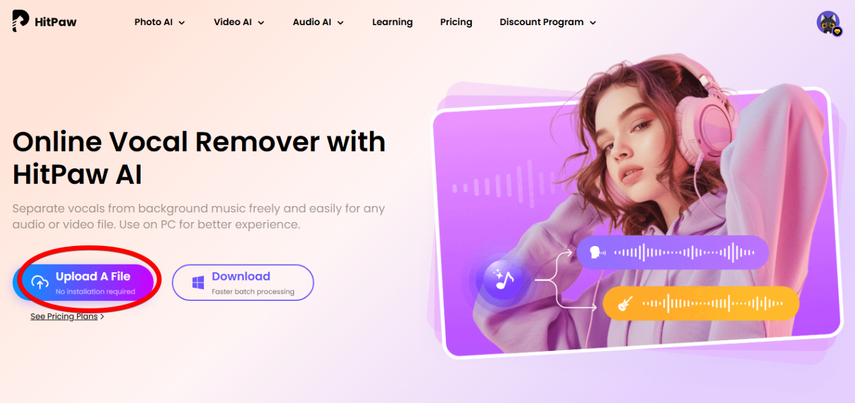
Step 1: Import Audio/ Video
To begin with, you'll need to import the video or audio file to enhance the audio on the official webpage of the HitPaw Online AI Audio Enhancer. This tool supports importing video formats such as WEBM, MOV and MP4, as well as audio formats such as MPG, FLV and MP3.
Step 2: Customize Audio Enhancement Settings
After opening the Enhancement section on the left side, adjust the background noise and audio volume settings to optimize audio quality to your preference.
Step 3: Download the Audio File
In this phase, you'll need to preview the enhanced audio and decide whether you want to make further changes. Then, you can hit Download to export the enhanced audio.
Conclusion
NotebookLM is a useful tool, but the notebooklm audio overview limit and feature restrictions can slow down your workflow. That is why many users now explore better options. The tools listed above provide more control, improved transcription, and creative features. Choosing the right one depends on your needs, but each option offers a strong alternative to notebooklm audio overview tools.
If you intend to enhance the generated audio, HitPaw Online AI Audio Enhancer can help. It offers a simple user interface and lets you increase the audio volume and reduce background noise.
Try It Now!


Home > Learn > [2026] 6 Best NotebookLM Audio Overviews Alternatives
Select the product rating:
Natalie Carter
Editor-in-Chief
My goal is to make technology feel less intimidating and more empowering. I believe digital creativity should be accessible to everyone, and I'm passionate about turning complex tools into clear, actionable guidance.
View all ArticlesLeave a Comment
Create your review for HitPaw articles