














7 Best AI Video Restoration Tools in 2026 to Fix Old Videos
Old videos often hold valuable memories, historical moments, or important business content. Unfortunately, many videos suffer from problems such as blur, noise, low resolution, faded colors, compression artifacts, or damage caused by aging storage devices. In some cases, users may even encounter corrupted video files that refuse to play properly.
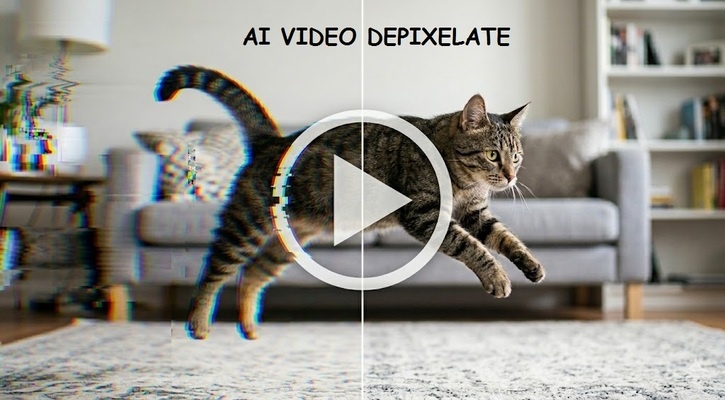
Fortunately, AI video restoration technology has made it easier than ever to repair and enhance old footage. Modern tools can sharpen details, remove noise, upscale resolution, restore colors, and improve overall quality with minimal effort.
In this guide, we compare the best AI video restoration tools available in 2026 and help you choose the right solution for your needs.
Quick Comparison of Top AI Video Restoration Tools
| Tool | Ease of Use | Platform | Supported Formats | Speed | Detail Recovery |
|---|---|---|---|---|---|
| HitPaw Online Video Enhancer | Excellent | Web-Based | MP4, MOV, AVI and more | Fast | Excellent |
| Wondershare Filmora | Very Good | Windows, Mac | Most common formats | Fast | Very Good |
| Vmake AI | Excellent | Web-Based | MP4, MOV | Fast | Good |
| TensorPix | Excellent | Web-Based | MP4, MOV, AVI | Fast | Very Good |
| Topaz Video AI | Good | Windows, Mac | Most major formats | Medium | Outstanding |
| UniFab AI | Very Good | Windows, Mac | Multiple formats | Medium | Excellent |
| AVCLabs Video Enhancer AI | Good | Windows, Mac | Common video formats | Medium | Excellent |
What We Test in AI Video Restoration Tools
Choosing the best AI video restoration software involves more than simply checking output quality. To create this comparison, we focused on the factors that matter most to everyday users and professionals alike.
Ease of Use
Not everyone has experience with professional video editing software. We evaluated how easy each platform is to navigate, upload videos, select restoration settings, and export finished files. Tools with simple workflows scored higher.
Processing Speed
AI video restoration can be resource-intensive. We compared how quickly each tool processes videos and whether users can restore footage efficiently without long waiting times.
Customization Flexibility
Some users prefer one-click solutions, while others want advanced controls for sharpening, denoising, frame interpolation, and color correction. We assessed how much flexibility each platform provides.
Detail Recovery
The most important factor is how well the tool restores lost details. We tested each solution's ability to sharpen blurry footage, remove artifacts, reduce noise, improve colors, and create a cleaner AI-restored video.
Top 7 AI Video Restoration Deep Review
1. HitPaw Online Video Enhancer
HitPaw Online Video Enhancer is a browser-based AI video restoration platform designed for users who want professional-looking results without downloading software. It uses AI models to improve video quality, remove blur, reduce noise, sharpen details, and upscale resolution. The online workflow makes it especially attractive for beginners who want a quick and convenient way to restore old videos.

Key Features
- AI-powered video enhancement
- Noise reduction
- Video sharpening
- Resolution upscaling
- Browser-based workflow
- One-click processing
Pros
- Very easy to use
- No software installation required
- Fast processing
- Supports multiple enhancement tasks
- Beginner-friendly interface
- Suitable for old family videos
Cons
- Requires internet access
- Premium features may require payment
- Large files may take longer to upload
Best For
Users who want a simple and effective AI video restoration solution without learning complex editing software.
Restore Now!2. Wondershare Filmora
Wondershare Filmora combines video editing and AI enhancement features in a single platform. It includes tools for denoising, sharpening, color correction, and video repair. While Filmora is primarily known as a video editor, its AI-powered restoration tools can help users improve the quality of old or damaged footage.
Key Features
- AI video enhancement
- Video editing suite
- Color correction
- Noise reduction
- Motion tracking
- Effects library
Pros
- Beginner-friendly editor
- All-in-one video solution
- Large template library
- Frequent updates
- Good balance of features and usability
Cons
- Some AI tools require additional credits
- Restoration quality not as strong as dedicated tools
- Subscription costs may add up
Best For
Content creators who want both video editing and restoration features in one platform.
3. Vmake AI
Vmake AI is a cloud-based AI enhancement platform designed to improve video quality quickly. It focuses on simplicity and automation, allowing users to upload videos and apply AI enhancements with minimal effort. Its restoration features can improve clarity, sharpen details, and make older footage look cleaner.
Key Features
- AI video enhancement
- Automatic processing
- Online access
- Quality improvement
- Resolution enhancement
Pros
- Extremely simple workflow
- Fast cloud processing
- No software installation
- Good for beginners
- Mobile-friendly platform
Cons
- Limited manual controls
- Fewer professional features
- Free version restrictions
Best For
Users looking for a quick and simple online video restoration tool.
4. TensorPix
TensorPix is an AI-powered video enhancement platform that focuses on restoring and improving older footage. It supports denoising, sharpening, color enhancement, and resolution improvements. Since processing takes place in the cloud, users can access powerful AI restoration tools without needing high-end hardware.
Key Features
- Cloud-based AI processing
- Denoising
- Video sharpening
- Upscaling
- Color enhancement
Pros
- Easy online workflow
- No powerful computer required
- Supports multiple enhancement types
- Fast processing
- Beginner-friendly
Cons
- Credit-based system
- Limited free usage
- Internet connection required
Best For
Users who want flexible cloud-based AI video restoration.
5. Topaz Video AI
Topaz Video AI is widely regarded as one of the most advanced AI video restoration tools available. It offers professional-grade denoising, deblurring, frame interpolation, upscaling, and enhancement capabilities. Many video restoration specialists rely on Topaz to restore archival footage and improve damaged recordings.
Key Features
- Advanced AI models
- Video upscaling
- Denoising
- Deblurring
- Frame interpolation
- Professional restoration tools
Pros
- Excellent detail recovery
- Powerful restoration capabilities
- High-quality output
- Professional-grade controls
- Frequent AI model updates
Cons
- Expensive compared to competitors
- Requires a powerful computer
- Steeper learning curve
Best For
Professional editors and advanced users who need maximum restoration quality.
6. UniFab AI
UniFab AI is an AI-powered video enhancement platform designed to upscale videos, improve image quality, and restore older footage. The software offers several enhancement models that help users repair visual imperfections and improve overall clarity.
Key Features
- AI upscaling
- Noise reduction
- Video enhancement
- Multiple AI models
- Batch processing
Pros
- Strong upscaling performance
- Multiple enhancement options
- Good output quality
- Batch processing support
- Suitable for large projects
Cons
- Desktop software installation required
- Processing can be time-consuming
- Premium pricing
Best For
Users who regularly work with large video restoration projects.
7. AVCLabs Video Enhancer AI
AVCLabs Video Enhancer AI uses deep learning technology to improve video quality, upscale resolution, and restore damaged footage. It offers specialized AI models designed for different video types and restoration scenarios, making it a strong alternative to more expensive professional solutions.
Key Features
- AI upscaling
- Face enhancement
- Noise reduction
- Color correction
- Multiple AI models
Pros
- Good restoration quality
- Face enhancement capabilities
- Easy-to-use interface
- Supports multiple AI models
- Regular software updates
Cons
- Requires local installation
- Hardware-intensive processing
- Premium license required for full features
Best For
Users looking for powerful AI enhancement without the complexity of professional editing suites.
How to Repair a Video with HitPaw
Restoring an old or low-quality video with HitPaw Online Video Enhancer is simple and requires no editing experience.
Repair Now!Step 1: Upload Your Video
Click the upload button and select the video you want to restore. This can be an old family video, blurry footage, or a low-resolution recording.
Step 2: Choose an AI Enhancement Option
Select the enhancement model, like Detail Recovery, and then choose output resolution, like 4K or 8K.
Step 3: Preview the Results
Review the restored video and compare it with the original version. Once you are satisfied with the result, download the enhanced version on your device.
FAQs about Video Restoration
Q1. What is video restoration?
A1. Video restoration is the process of improving old, damaged, blurry, noisy, or low-quality footage. It often includes denoising, sharpening, color correction, and upscaling to create a cleaner and more visually appealing video.
Q2. Can AI restore old videos?
A2. Yes. Modern AI video restoration tools can significantly improve old footage by reducing noise, sharpening details, restoring colors, and enhancing resolution automatically.
Q3. Is video restoration the same as video repair?
A3. Not exactly. Video restoration focuses on improving visual quality, while video repair often refers to fixing corrupted or damaged files that cannot be played correctly.
Q4. Can I restore videos online for free?
A4. Some platforms offer free trials or limited free plans that allow users to restore videos online. However, advanced features and higher-quality exports may require a paid plan.
Q5. What is the best AI video restoration software?
A5. The best tool depends on your needs. HitPaw Online Video Enhancer is excellent for beginners, while Topaz Video AI is often preferred by professionals seeking advanced restoration capabilities.
Q6. Can AI fix blurry videos?
A6. Yes. Many AI restoration tools can reduce blur, sharpen details, and improve overall image clarity, making videos look cleaner and more professional.
Conclusion
AI video restoration tools have made it easier than ever to repair and improve old footage. Whether you need to enhance family memories, restore historical videos, or fix low-quality recordings, there are excellent solutions available for every skill level.
Out of all, HitPaw Online Video Enhancer stands out for its ease of use, fast processing, and powerful AI enhancement features. If you want a simple way to restore and improve your videos, give HitPaw Online Video Enhancer a try today.
Repair Now!



Home > Learn > 7 Best AI Video Restoration Tools in 2026 to Fix Old Videos
Select the product rating:
Natalie Carter
Editor-in-Chief
My goal is to make technology feel less intimidating and more empowering. I believe digital creativity should be accessible to everyone, and I'm passionate about turning complex tools into clear, actionable guidance.
View all ArticlesLeave a Comment
Create your review for HitPaw articles