
















In-depth SwapFans AI Reviews
AI technology has evolved greatly over time. Initially, the tool could only be replaced with a simple photo, and the finish was often unnatural or unclear. As of 2026, this technology has realized the replacement of the entire video with smooth movements and natural facial expressions. These advances are based on a more advanced deep learning system that allows you to understand angles, lighting, and facial details. Today, deepfake tools play a major role in entertainment, social media trends, and digital art production. Many creators use these to create buzzing videos and creative edits. SwapFans AI is one of the leading tools in this field, providing simple operation and high-quality results from beginners to professionals.
Create Now!What are SwapFans?
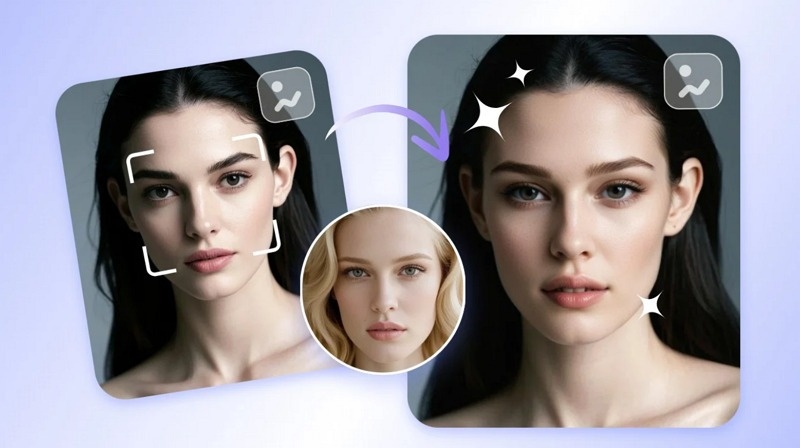
SwapFans AI is the latest face replacement tool that can easily replace the face in photos and videos. Use artificial intelligence to detect and match facial features. This tool emphasizes natural finish. With time savings and high-quality output, they have been selected by many users for social media content, entertainment, and creative digital projects.

Definition of SwapFans AI
SwapFans AI is an advanced platform designed for face replacement in both image and video. Users can upload media and replace faces with others' faces. The tool focuses on precision and smooth blending. Because it works online, users do not need to install heavy software. This makes it easy to access from any device.
How Deep Learning Works in SwapFans
SwapFans AI uses deep learning algorithms to analyze facial features. Detect important points such as eyes, nose, lips, face shape, and map new faces to the original media. The system adjusts the lighting, skin color and angle according to the scene. In addition, AI tracks the movements in the video, so the replaced faces follow the facial expressions and head movements accurately.
Use Cases of SwapFans AI
SwapFans AI is useful for a variety of applications. Content creators use it to create interesting and engaging videos for social media. Influencers create trending videos using the facial replacement effect. Digital artists use it for creative projects and storytelling. It also helps marketers design unique ads that attract attention.
Key Features of SwapFans
SwapFans AI offers several features for easy and effective facial replacement. Focus on both quality and ease of use. Users can create real results without professional knowledge. The platform supports both photography and video and is useful for various types of projects. The following are the main features that SwapFans AI is popular with users.
AI Video Face Swap
SwapFans AI can replace the face in the video with high accuracy. The system tracks face movements per frame. This makes the new face naturally familiar to the expression and movement. Even if the subject is moving quickly, AI realizes smooth replacement.
Photo Realism
This platform also maintains the original image quality when replacing faces. Adjust the skin texture, shadow, and lighting to match the scene. This makes the final image look real, not edited. Users can create high-quality visuals without additional editing. This feature helps both general and professional users.
Multi-Face Swapping
SwapFans AI supports multiple face swaps in one image or video. Users can replace several faces in group photos or scenes. This feature is useful for making fun edits with friends or creating unique content. The system detects each face and processes them individually. It keeps consistency in lighting and angles for all faces.
Fast Processing
SwapFans AI processes files quickly using optimized algorithms. Users can upload media and receive results within minutes. This saves time compared to older editing tools that require manual work. Even longer videos can be processed without long delays, which makes the tool efficient for daily use.
Easy-to-Use Interface
The platform offers a simple dashboard that anyone can understand. Users can drag and drop files, select faces, and start the process easily. No technical skills are required. The layout is clean, which helps users focus on their task. Beginners can learn quickly, while experienced users can work faster. This ease of use makes SwapFans AI suitable for a wide range of users, including students, creators, and marketers.
Pros
- High Accuracy: SwapFans AI keeps facial expressions and movements natural. The output does not look forced or fake.
- User-Friendly: The platform is easy to understand. New users can start creating content without learning complex tools.
- Speed: The system processes files quickly. Users can create content in minutes instead of hours.
- Accessibility: Users can access the tool from a web browser. Some versions may also support mobile use, which helps people edit on the go.
- Quality Retention: The final output keeps high resolution. Images and videos do not lose clarity after processing.
Cons
- Subscription Cost: The free version offers limited features. Users need a paid plan to access full options and better quality.
- Ethical Concerns: Face swap technology can be misused. Users must use it responsibly and avoid harmful content.
- Learning Curve for Advanced Edits: Basic swaps are easy, but detailed edits may take time to learn.
- Internet Dependency: The tool works online. Users need a stable internet connection for smooth processing.
SwapFans Quick Guide: How to Use It?
SwapFans AI is easy to use and does not require editing skills. The platform guides you through each step carefully. From uploading files to downloading results, the process is quick and easy. By simply following a few simple steps, users can create high-quality face replacement of images and videos without feeling confused or technical difficulties.
Getting Started
First, visit the SwapFans AI website and create an account. After logging in, go to the dashboard and upload the image or video. Choose a clear file for better results. Once the file is uploaded, select the face you want to replace. The system will guide you through the following steps: This process is completed in just a few minutes. Whether you are a beginner or you don't have technical knowledge or editing experience, you can easily follow these steps.
Perfecting the Swap
To get the best results, choose a high-quality source image. The face must be clear, front facing, and with enough lighting. Avoid blurry or dark images to reduce output quality. Try to match the angle and lighting of both faces. This helps AI to produce natural results. If the tool can be adjusted, fine-tune the position of the face. Even minor improvements make a big difference to the final output.
Video Editing Basics
To save time, crop the video before uploading it. The shorter the clip, the faster the processing and the better the result. Remove unnecessary parts so that AI can focus on important scenes. After changing the face, you can edit the video further as needed. Some tools allow basic trimming and adjustment. Keep your videos simple and improve system performance. This procedure improves both the speed and quality of the final output.
Troubleshooting
If the face looks blurry, use a higher-quality image. If alignment looks wrong, adjust the face position if the option is available. Lighting mismatch can affect realism, so choose similar lighting in both images. If the video looks unclear, try using a shorter clip. Also, check your internet connection because slow speed can affect processing. These simple fixes can solve most common problems and improve your results quickly.
Best Alternative to Free Vidmage AI Face Swap HitPaw Online AI Video Face Swap
HitPaw Online AI Video Face Swap is a popular web-based tool that allows users to easily create face-to-face content. Since it works directly on the browser, there is no need to install the software. This tool supports both image and video, and can flexibly accommodate various types of content. Because it emphasizes simplicity, it is also suitable for beginners. Users can upload files, swap faces, and download results within minutes. In addition, the basic function is free and convenient for trial use. Many users choose this as an alternative tool to provide high-quality finishes and simple operability.
Key Features and Advantages
- Ultra-Realistic AI Video Face Swap: Tracks facial movement and expressions for natural results.
- Easy Video Face Swap for Anyone: Simple interface that works without technical skills.
- Free & Unlimited Online Video Face Swap: Offers free access for basic usage.
- Go Viral with Face Swap Video on social media: Helps create engaging and shareable content.
How to Generate Face Swap Videos with HitPaw
Step 1.Visit HitPaw's AI Face Swap website and click "Swap Now." Start face swapping instantly online.
Step 2.Upload your main photo. The clearer your image, the better the swap.
Step 3.Add your target face photo. The AI will align both faces automatically.
Step 4.Hit "Swap Face" and wait a few seconds. You'll see a seamless transformation instantly.
Step 5: Download your final photo and share it anywhere. It's quick, free, and incredibly fun!
Summary
SwapFans AI is a powerful face replacement tool for 2026. With high accuracy and simple operability, you can edit both photos and videos. Users can create realistic face replacements without spending hours editing. The platform is ideal for content creators, social media users and digital artists. A paid plan is required to use all functions, but it is worth considering from the high quality. In addition, the processing speed is high and the output quality is high. However, users must use face replacement technology responsibly. It is important to respect privacy and avoid exploitation. In general, SwapFans AI is an excellent choice for those who want to create creative and attractive content using AI face replacement technology.
Create Now!




Home > Learn > In-depth SwapFans AI Reviews
Select the product rating:
Natalie Carter
Editor-in-Chief
My goal is to make technology feel less intimidating and more empowering. I believe digital creativity should be accessible to everyone, and I'm passionate about turning complex tools into clear, actionable guidance.
View all ArticlesLeave a Comment
Create your review for HitPaw articles