
















How to Make Viral Gugu Gaga Penguin Video (Step-by-Step Guide for Creators)
If you want to know " How to Make Viral Gugu Gaga Penguin Video " you are not alone. Now, this trend has become a hot topic everywhere, with creators recording millions of views with simple penguin videos. Happily, you don't need editing skills or expensive tools. With AI, anyone can create these videos in minutes. In this guide, we will introduce " How to Make Viral Gugu Gaga Penguin Video step by step" using a simple method. Learn how to write prompts, choose the right style, and create content that people want to see over and over again.
Part 1: What Is the Gugu Gaga Penguin Video Trend?
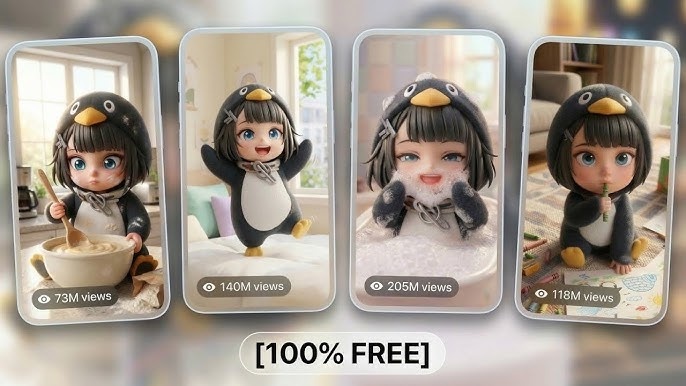
"Gugu Gaga Penguin" boom is a cute video created by AI where penguins behave like babies and humans. These videos are fun, simple and easy to enjoy, so they spread in an instant. Typical Gugu Gaga Penguin videos feature comical gestures, baby-like sweet voices, and emotional expressions. Penguins may speak, dance, or even cook like humans.
Common elements you'll see:
- Penguins saying "gugu gaga" in a baby voice
- Acting like humans (cooking, studying, working)
- Funny or extra cute behavior
Popular genres include speaking penguins, dance videos, everyday scenes and meme-like editing. This is also part of the "cute penguin trend" boom that continues to spread rapidly.
Part 2: Why Gugu Gaga Penguin Videos Go Viral
If you want to understand how to make viral Gugu Gaga Penguin video, you first need to know why they buzz. The reason why these videos become popular is because they are simple and appealing to emotions and are easy to see as many times as possible. People prefer cute content, and penguins are already humorous.
Here's the simple idea behind a viral penguin ai video:
- Cute characters grab attention quickly
- The first 3 seconds hook the viewer
- "Gugu gaga" sound is easy to remember
- Short clips make people replay
- AI tools allow quick creation
Viral Formula:
Character + Baby Voice + Action + Emotion + Loop
Part 3: Best Tool to Create Gugu Gaga Penguin Videos
If you are learning how to make viral Gugu Gaga Penguin video, choosing the right tool will make a big difference. With excellent tools, you can save time and work easier, especially for beginners. You don't want to spend hours editing and manipulating.
Why Use HitPaw Online AI Video Generator
If you are serious about " how to make viral Gugu Gaga Penguin video" choosing the right tool is really important. With the right tools, you can save time and make your entire work much easier. HitPaw Online AI Video Generator is a simple tool that works directly on your browser, so you don't need to install anything. Even if you don't have editing experience, you can create quality videos without getting lost. Since you can convert text and images to videos with just a few clicks, it is a great choice not only for beginners but also for creators who want to produce multiple videos quickly and stably.
Key Features
- Instantly turn your ideas into a viral-ready Gugu Gaga Penguin video using simple text or images no waiting, just quick AI magic.
- Make your penguin content stand out with unique, eye-catching AI styles and creative effects designed for viral impact.
- Add custom end frames to give your video a memorable finish and strengthen your personal or brand identity.
- Perfect for beginners no skills, no software downloads, and zero ads just create and go viral effortlessly.
Best for:
- New creators
- People making many videos daily
- Short-form content like TikTok or Shorts
Part 4: How to Make Viral Gugu Gaga Penguin Video from Text
If you want to learn how to make viral Gugu Gaga Penguin video easily, start with text is a wise choice. This method is simple and requires no design or editing skills. Just enter a short prompt and the AI will convert it to a video. Not only can you save time, but it also helps you to try out different ideas quickly.
Step-by-Step Guide
Step 1.Open the HitPaw Online platform and go to the TextVid section under AI Video Tools. Select a model based on credit cost, duration, and audio/video quality.
Create Now!

Step 2.Enter a detailed text prompt (e.g., "Three little figures in the palm interact, laughing and making sounds"). Adjust settings such as duration, aspect ratio (16:9), and auto sound toggle. Add optional negative prompts if you want to exclude elements.
Step 3.Click Generate to create your video. Wait for processing credits will be deducted. Once complete, review the preview under My Creations (e.g., anthropomorphic tabby cat in supermarket, fluffy orange cat at swimming pool).
Step 4.Compare the generated video with your original idea (e.g., figurines in penguin costumes on a hand). If satisfied, download or remix. If adjustments are needed, refine the prompt or switch models for a different style. Videos are stored temporarily for review.
Pro Tips for Better Results
If you understand the basics of "How to make a buzzing Gugu Gaga Penguin movie," you can make a big difference with a little ingenuity. What is important is not to complicate it, but to make it more attractive and natural. Just a little change in behavior, emotion, and timing will improve video performance.
Keep these tips in mind:
- Add actions like dancing or cooking
- Include emotions like happy or shy
- Use "baby voice" in prompts
- Keep videos between 5-10 seconds
Part 5: How to Make Viral Gugu Gaga Penguin Video from Image
If you already have an image of a penguin, this method is perfect for learning how to make a buzzing Gugu Gaga penguin video. Instead of creating from text, just animate the image using AI. You can quickly and easily adjust the character's appearance more finely.
Step-by-Step Guide
Step 1.Open the HitPaw Online platform and go to the Img2Vid section under AI Video Tools. Browse available models such as Google Veo3.1 (movie-quality video with audio) or Pixverse V5.5 (multi-shots cinematic storytelling). Select the model that best fits your creative goal.
Create Now!
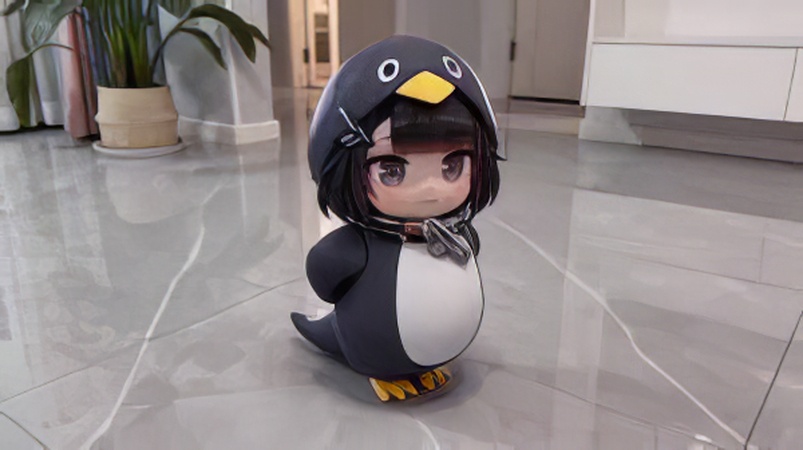
Step 2.Upload an image if required (e.g., anime-style girl in penguin onesie) or simply enter a detailed text prompt describing your idea (e.g., "A tiny anime-style girl waddling on a vast asphalt highway as cars zoom past"). Adjust settings like duration, resolution, and aspect ratio.
Step 3.Click Generate to create your video. Wait for processing credits will be deducted. The preview panel will show your rendered clip (e.g., penguin-costumed character crawling on a city road). If the output doesn't match your vision, refine the prompt or switch models.
Step 4.Review the final video result. Confirm that the cinematic storytelling matches your description (e.g., whimsical penguin character startled by passing cars). Download the video or remix it further. Generated clips are stored temporarily in My Creations for easy access.
Example prompts:
Following are the two example prompts:
- "A cute baby penguin standing in front, talking in soft baby voice saying 'Gugu gaga', slowly blinking eyes, small body movements, happy face, smooth animation, short loop video"
- "Cute penguin dancing side to side, waving small hands, smiling face, baby voice saying 'Gugu gaga', bright background, playful mood, smooth loop animation"
Image Optimization Tips
When learning how to make a buzzing Gugu Gaga Penguin movie, the image you choose will have a big impact on the finish. Clear and expressive images make it easier for AI to produce better movements and natural animations. If the image is dulled or unclear, the attraction of the video may be halved.
Here are some simple tips to follow:
- Use high-quality cartoon-style penguin images
- Choose front-facing characters for better lip sync
- Make sure the face is clear and easy to see
- Pick images with strong emotions (happy, shy, funny)
- Avoid blurry or low-resolution pictures
- Keep the background simple so focus stays on the penguin
Part 6: How to Make Viral Gugu Gaga Penguin Video with Templates
If you want to learn how to make a buzzing Gugu Gaga Penguin video easily, the template is very helpful. Instead of starting from scratch, we utilize existing formats that are already proven. This saves time and simplifies work, especially for beginners.
Create Now!Step-by-Step Guide
Step 1.Go to the HitPaw Online platform and open the Effects section under AI Video Tools. Browse the available effects in the pop-up window (e.g., Figure Me Up! Ghostface Terror, Haunting Doll). Select your desired effect here, Figure Me Up! is highlighted.
Step 2.Upload your image (e.g., penguin figurine photo) into the Image section. Choose your preferred resolution (360P-1080P; in your screenshots, 720P is selected). Confirm the credit requirement (40 credits) and click Generate to process the effect.
Step 3.Review the generated video under My Creations. For example, the preview shows a hand placing a penguin figurine in front of a computer monitor displaying a 3D model of the same figurine. Confirm the effect matches your selection, then download or remix as needed. Generated clips are stored temporarily with resolution and timestamp details.
Why Templates Work
- Pre-optimized for engagement
- Proven viral structure
- Faster production
- Great for batch content creation
Templates are perfect if you want to make multiple viral penguin ai video clips quickly.
Part 7: Tips to Make Your Penguin Video Go Viral
Making a video of "Gugu Gaga Penguin" is fun, but it takes a little strategy to buzzing it. The first few seconds are the most important, and subtitles, loop playback, and trendy sounds will give viewers a chance to watch them over and over again.
To maximize virality:
- Hook viewers in the first 3 seconds.
- Add subtitles for better retention.
- Design loopable endings for repeat views.
- Use trending audio for higher reach.
- Post consistently: 3-5 videos per day.
Creator Insight: Success comes from volume and testing, not just one video. Combining multiple gugu gaga penguin video posts increase chances of going viral.
Part 8: FAQs about How to Make Viral Gugu Gaga Penguin Video
Q1. What is a Gugu Gaga Penguin video?
A1. "Gug Gaga Penguin" video is a short video generated by AI where cute penguins appear. In many cases, they speak out like babies, do interesting gestures, and show playful expressions. These videos are made to be fun and easy to share, making them perfect for a cute penguin boom.
Q2. Can beginners create viral Gugu Gaga Penguin videos?
A2. Yes, even beginners can make it without editing skills. AI tools like HitPaw Online AI Video Generator automatically process animations and effects. It automatically generates AI videos of penguins that the tool buzz by simply typing ideas, prompts, and images.
Q3. How long should a viral Gugu Gaga Penguin video be?
A3. For TikTok, Shorts and other social media, 5-10 seconds is the best choice. Short videos attract viewers' interest and encourage repeated playback and sharing. This length maximizes the engagement and reaches of Gug Gaga Penguin videos.
Final Thoughts: Scale Your Viral Penguin Content with AI
If you learn how to make viral Gugu Gaga Penguin video, you can easily ride this cute penguin boom and create content that is loved by people. The important thing is to quickly create videos, keep the quality constant, reuse templates and save time. Short, loop playable clips with catchy baby calls are easy to share and improve reach and engagement. With AI, you can focus on ideas and fun actions while automatically processing repetitive tasks. HitPaw Online AI Video Generator is ideal for creators seeking simple and fast results. Even if you don't have experience, it helps you generate, edit, and produce buzzing penguin AI videos efficiently.
Create Now!


Home > Learn > How to Make Viral Gugu Gaga Penguin Video (Step-by-Step Guide for Creators)
Select the product rating:
Natalie Carter
Editor-in-Chief
My goal is to make technology feel less intimidating and more empowering. I believe digital creativity should be accessible to everyone, and I'm passionate about turning complex tools into clear, actionable guidance.
View all ArticlesLeave a Comment
Create your review for HitPaw articles