
















Create Smoother Video Transitions with AI Technology
Smooth video transitions play a crucial role in how professional and engaging a video feels. Abrupt scene changes can break the viewing experience, while well-designed transitions help guide the audience naturally from one moment to the next. As video content becomes increasingly important across social media, marketing, and personal storytelling, creators are looking for faster and smarter ways to improve video flow. This is where ai video transition technology comes into play. By using artificial intelligence, modern video tools can automatically generate more natural transitions, reducing manual editing time and lowering the technical barrier for creators of all skill levels.
Part 1. Why Smooth Transitions Matter in Modern Video Content

Video transitions are more than visual effects; they directly affect pacing, clarity, and emotional continuity. In short-form videos, even a one-second cut can feel jarring if the transition is poorly handled. For longer videos such as vlogs, tutorials, or promotional content, inconsistent transitions can make the entire video feel unpolished.
Traditionally, creators relied on hard cuts or pre-made transition effects. While functional, these methods often fail to adapt to the actual content of the video. As audiences grow more accustomed to high-quality visuals, expectations for smoothness and coherence continue to rise. This shift has created demand for smarter transition solutions that can adapt to different scenes automatically.
Part 2. How AI Is Changing the Way Video Transitions Are Made
An ai video transition uses machine learning to analyze video frames, motion, and scene changes. Instead of applying the same transition effect to every cut, AI evaluates how one scene flows into the next and generates a transition that feels more natural.
For example, AI can detect changes in lighting, movement, or subject positioning and adjust transition timing accordingly. This results in smoother visual continuity without requiring manual fine-tuning. Unlike traditional templates, AI-powered transitions adapt to the content itself rather than forcing the content to fit a preset effect.
This approach significantly reduces editing time and allows creators to focus more on storytelling instead of technical adjustments.
Part 3. Manual Editing vs AI-Powered Video Transitions
To better understand the value of AI-powered video transitions, the table below compares traditional manual editing with AI-based transition methods across key factors.
| Aspect | Manual Video Editing | AI-Powered Video Transitions |
|---|---|---|
| Editing Time | Time-consuming, requires frame-by-frame adjustments | Automatically generated, significantly faster |
| Skill Requirement | Requires professional editing knowledge | Beginner-friendly, minimal technical skills needed |
| Consistency | Varies depending on editor experience | Consistent transitions across the entire video |
| Flexibility | Full control, but complex to manage | Intelligent adaptation based on video content |
| Workflow Efficiency | Slower production process | Streamlined and efficient workflow |
| Suitable Users | Professional editors | Content creators, marketers, casual users |
This comparison highlights why ai video transition solutions are increasingly preferred by creators who prioritize speed, consistency, and ease of use over manual fine-tuning.
Part 4. Using HitPaw Online AI Video Generator to Enhance Video Transitions
Creating smooth and professional video transitions no longer requires complex software or advanced editing skills. HitPaw Online AI Video Generator is an online platform that uses AI technology to automatically generate polished video transitions, making it easy for creators to produce high-quality content efficiently. Whether you are editing short social media clips, vlogs, or marketing videos, HitPaw simplifies the process while ensuring natural flow between scenes.
Key Features
- AI-Powered Video Transitions: Automatically analyzes video content and generates seamless transitions.
- Image-to-Video Integration: Combine images and video clips with smooth transition effects.
- Text-to-Video Support: Generate video content from text prompts for creative storytelling.
- Online and Browser-Based: No installation required; work directly from any modern browser.
- User-Friendly Interface: Designed for beginners and professionals alike, minimizing learning curve.
- Fast Processing: Quickly produces high-quality transitions, saving editing time.
How to Use HitPaw Online AI Video Generator
Step 1: Select "Image to Video" Mode
Open HitPaw Online AI Video Generator and choose the "Image to Video" option. This mode lets you turn static images into a dynamic video with AI-powered transitions.
Step 2: Upload Two Images and Pick a Transition
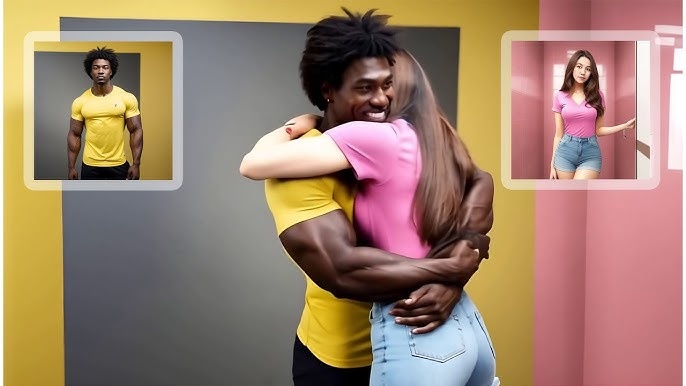
Upload the two images you want to connect. Select a transition effect, or let the AI automatically determine the smoothest way to link the images.
Step 3: Generate Your Transition Video
Click "Generate" and let the AI create a video that seamlessly transforms the first image into the second, adding natural and visually appealing transitions.
Step 4: Preview and Download
Once the AI finishes processing, preview your video. If satisfied, export and download it for sharing or further editing.
Part 5. Where AI-Based Transitions Work Best
AI-powered video transitions are especially effective in scenarios where speed and consistency matter.
- Social Media Videos: Short-form content benefits from smooth pacing and clean transitions.
- Vlogs: Natural transitions help maintain narrative flow.
- Marketing Videos: Professional-looking transitions enhance brand credibility.
- Educational Content: Smooth transitions help viewers stay focused on the material.
- Personal Projects: AI tools simplify editing for casual creators.
Across these use cases, AI transitions help maintain visual coherence without requiring professional-level skills.
Conclusion
As video content continues to dominate digital platforms, smooth transitions have become an essential element of high-quality production. An ai video transition offers a smarter and more efficient way to enhance video flow, reducing the need for manual editing while delivering consistent results.
Among available online solutions, HitPaw Online AI Video Generator stands out as a practical choice for creators seeking an accessible and AI-driven approach to video transitions. By combining online convenience with intelligent video processing, it provides a reliable way to create smoother, more engaging videos with less effort.
Generate Now!




Home > Learn > Create Smoother Video Transitions with AI Technology
Select the product rating:
Natalie Carter
Editor-in-Chief
My goal is to make technology feel less intimidating and more empowering. I believe digital creativity should be accessible to everyone, and I'm passionate about turning complex tools into clear, actionable guidance.
View all ArticlesLeave a Comment
Create your review for HitPaw articles