
















AI Interview Baby Video Generator: Create Viral Baby Videos
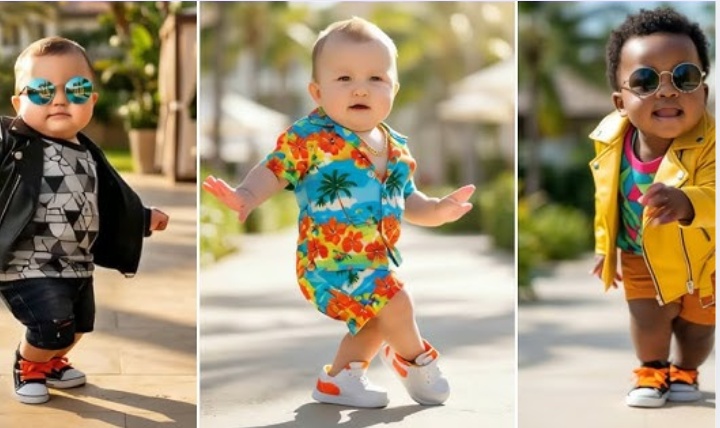
Cuteness overload! That pretty much describes AI interview baby videos, the new trend gripping short-form video content platforms like TikTok. And they're absolutely hilarious. Users keep coming up with new and inventive questions to ask kids and show them responding in the cutest, most gut-busting, funny ways. If you're looking to join the trend, ride the wave, and grab the attention of a large audience, this is one of the best ways to do it. Everyone loves babies. They are cute, cuddly, and effortlessly funny. Their innocent smiles light up even the most hardened faces. So, here's a complete guide on the top AI interview baby video generators for creating viral videos.
Part 1: Why Use AI Interview Baby Video Generators?

Social media users aren't the first people to think of this idea. Numerous creative people, from advertisers to filmmakers (think Boss Baby), have used the trope of infants speaking with adult logic and emotions to tell a story. With AI interview baby video generators, that trope is now accessible to billions of internet users. And they have taken this opportunity to let their creativity flow.
And why wouldn't they? Everyone loves cute babies talking like adults. Creators use this to criticize real individuals by making baby avatars imitate them and demonstrate the childishness of their arguments. From parody to satire to plain old fun, AI interview baby video generators can create anything you like.
Part 2: Top 5 AI Interview Baby Video Generators
1. HitPaw Online AI Video Generator
HitPaw Online AI Video Generator is a browser-based AI tool that turns text and image prompts into videos. You can easily create an AI interview baby video using this tool. It's fast, easy to use, and highly versatile, making it suitable for generating videos in a variety of contexts. Many influencers and professionals already use it to fuel their success.
Key Features of HitPaw Online AI Video Generator for Roast Videos
- HitPaw Online AI Video Generator turns your text and image into a fun and realistic interview baby video that people will enjoy watching.
- You can choose how the video starts and ends, thereby exercising more control over what happens in the video.
- You can make videos without watermarks, ads, or expensive subscriptions on the free plan.
- Get started right away and create your first interview baby video in seconds.
- You can use text, images, or both to create your video. Let your imagination run wild.
- Change everything that matters, like video length, resolution, quality, and more.
How to Use HitPaw Online Car Video Generator
- Step 1: Open HitPaw Online AI Video Generator
- Step 2: Prompt and Customization
- Step 3: Preview and Download
Go to the official website of HitPaw and navigate to the HitPaw Online AI Video Generator page. Choose the 'AI Video' generator and make a choice between 'Text to Video' and 'Image to Video'.
Choose an AI model from the list. Input your prompt for the interview baby video, customize quality settings, and click on 'Generate'.
The AI generates an interview baby video for you. Preview it and download.
2. Media.io AI Interview Baby Video Generator
Easily one of the most popular baby video generators, Media.io AI Interview Baby Video Generator is designed for speed and convenience. Just enter the prompt, generate a video, and hit the ground running. The tool is optimized for vertical format platforms like TikTok, Instagram, and YouTube Shorts, so it produces high-quality, immersive baby interview videos.
Pros
- Easy process. Beginner-friendly
- Vertical 9:16 aspect ratio supported for short-form video platforms
- Offers a good variety of templates to make the process easier
Cons
- Not nearly enough customization options
- Looks less realistic
3. DreamFace AI Baby Avatar Interview Generator
This is another leading name among AI baby video generators. DreamFace AI offers a dedicated baby interview generator with robust features. Unlike most other tools, DreamFace AI generates perfectly lip-synced baby videos that look like the real deal. You can even control the baby's movements, expressions, and mannerisms.
Pros
- Realistic animation and expression
- Accurate lip-syncing
- The AI skillfully replicates the instructions in text prompts to video elements
- Life-like imitations of babies with coos, giggles, and more
Cons
- Suitable for realistic projects, not cartoonish content
- Requires a premium plan for advanced features access
4. Parrot AI Baby Podcast Generator
Parrot AI is one of the leaders among baby interview video generators for a reason. It doesn't just create interview baby videos; it creates full-blown podcast videos with energy, expressions, and everything else. The videos are crisp, crystal-clear, and rich with human-like expressions. More importantly, Parrot AI is a one-stop shop that creates everything from scripts to animations.
Pros
- Complete package. Creates everything from scripts to voiceovers to video
- Quick turnaround time
- Generates the highest engagement-style content, i.e., podcast
- Great for scaling content creation
Cons
- Few customization options are available
5. GoEnhance AI Baby Podcast Generator
GoEnhance AI is one of the more versatile baby interview video creators. Like Parrot AI, GoEnhance AI excels in creating baby podcasts. It can use your text prompts, image, or even videos to create a lifelike baby podcast video that leaves your audience swooning over it. You can supply it with text or a script and let it do its magic.
Pros
- Highly flexible
- Offers a dedicated baby podcast generator
- Fantastic output quality
- Uses video as input, among other options, which is quite rare
- Lots of style options
Cons
- Realism may vary across different styles
FAQs on AI Interview Baby Video Generator
Q1. Is it safe to use AI interview baby generators?
A1. It is safe as long as you follow legal guidelines and ethical best practices. Do not use children's images without their parents' consent. Label the content as AI-generated, do not misrepresent or use offensive language, and do not impersonate real people.
Q2. What makes a good AI interview baby video?
A2. The best baby interview videos have a visibly AI-generated feel. They do not try to deceive their audiences. The jokes are funny, lighthearted, and not remotely offensive. In fact, they are wholesome.
Q3. Can I use my own voice instead of the AI voice?
A3. Yes. Some tools let you upload your voiceover, and the baby avatar will lip-sync with it.
Conclusion
AI interview baby videos are fun, creative, and very popular on social media. They make people laugh by showing babies talking and answering questions playfully beyond their typical years. Sometimes, they imitate real-life celebrities too. Since babies are cute and funny, these videos grab attention and go viral quickly. Whether you want to make videos just for fun or to grow your social media page, HitPaw Online AI Video Generator is one of the best ways to do it. Try it today!
Generate Now!*Final Reminder: This page is for informational purposes only and does not constitute legal advice. Before using any features, please make sure that:
- You must have full and clear authorization for all uploaded content, which must not involve minors.
- You have read and understood the HitPaw Terms of Service and HitPaw Privacy Policy.
- All content you generate or use complies with applicable local, national, and international laws.
-
This service is not used to:
- Produce pornographic, sexually explicit or obscene content;
- Harass, exploit, harm, or infringe on the rights or dignity of others;
- Impersonate, falsely represent, or mislead regarding any real person;
- Infringe on others' privacy, portrait, reputation, copyright, or other legal rights.
HitPaw disclaims all liability for any content or actions that violate these rules and reserves the right, to the fullest extent permitted by law, to restrict, remove, or block any content that may violate applicable laws, regulations, or platform policies.




Home > Learn > AI Interview Baby Video Generator: Create Viral Baby Videos
Select the product rating:
Natalie Carter
Editor-in-Chief
My goal is to make technology feel less intimidating and more empowering. I believe digital creativity should be accessible to everyone, and I'm passionate about turning complex tools into clear, actionable guidance.
View all ArticlesLeave a Comment
Create your review for HitPaw articles